
CRED External API — Getting Started
The CRED External API is a real-time, self-serve GraphQL API covering identity
matching, enrichment, actions (workflows, sequences, CRM, lists,
reports, imports), analytics, the AI assistant, and paginated data
connections (companies, people, contacts, deals).
The fastest way to explore and use it is the interactive playground — a browser
reference where you pick an operation, fill in a form, paste your token, and run it
live. This guide walks you through it.
1. The Playground
Open the playground for your environment:
| Environment | Playground |
|---|---|
| Production | https://api.external.credplatform.com/playground/ |
| Staging | https://api-staging.external.credplatform.com/playground/ |
All functionality is consistent across environments except dataset size and SLA guarantees.
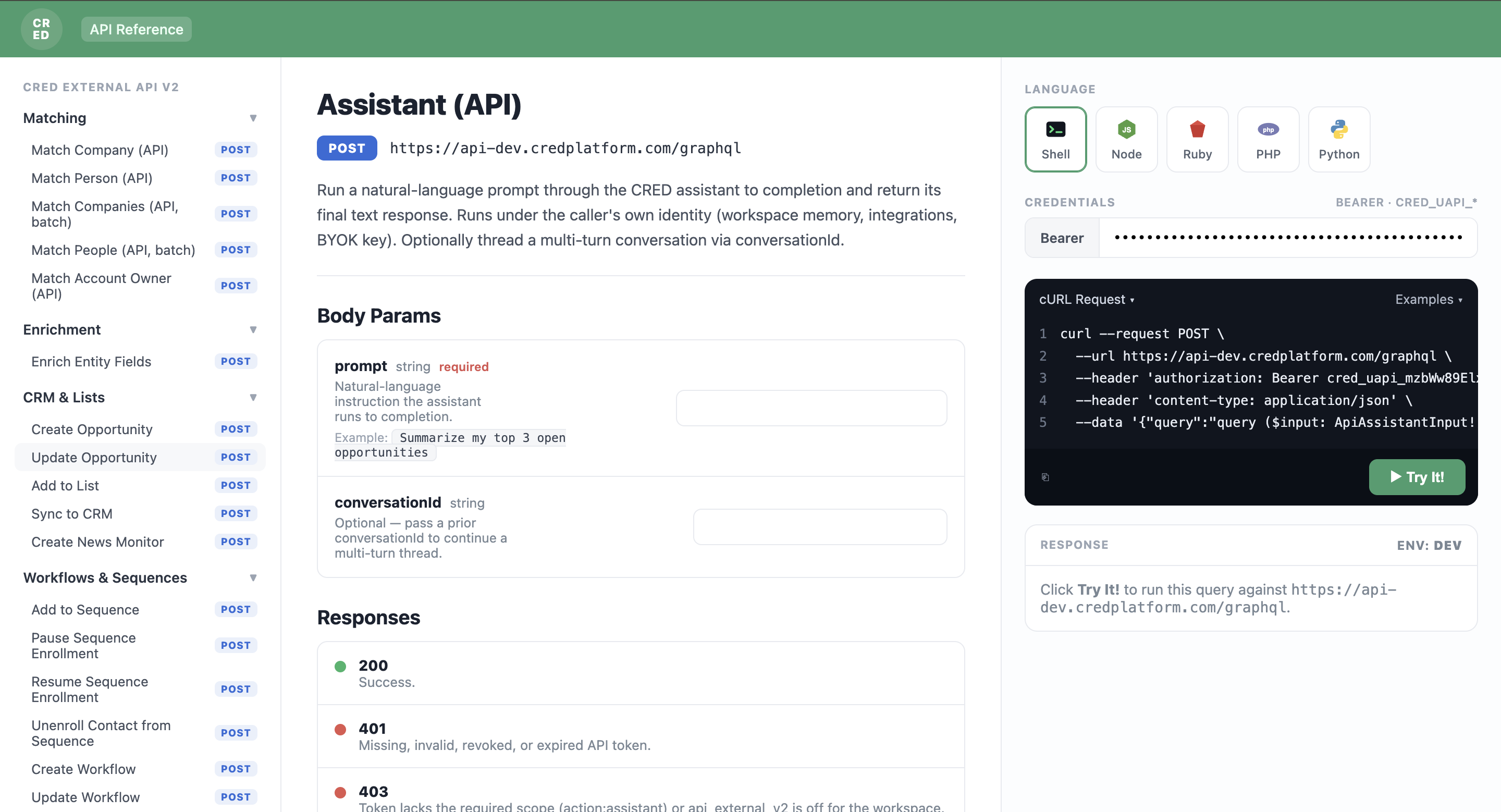
Inside the playground:
- Left rail — every operation, grouped by category (Matching, Enrichment, Data
Connections, Assistant, Fields & Schema, CRM & Lists, Workflows & Sequences,
Reports & Scoring, Imports, Analytics). - Center — the selected operation: description, body-params form, and the
response shapes (200 / 401 / 403). - Right rail — a ready-to-run request with language tabs (Shell / Node / Ruby
/ PHP / Python), a Bearer token field, and a Try It! button.
2. Get an API Token
Every request needs a scoped API token, which you mint inside CRED.
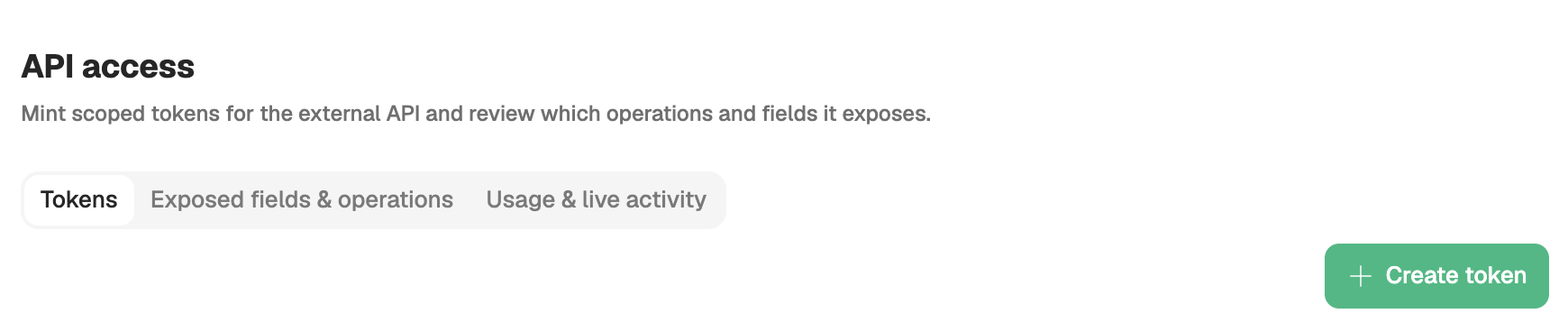
- Go to Settings → API Access → Tokens.
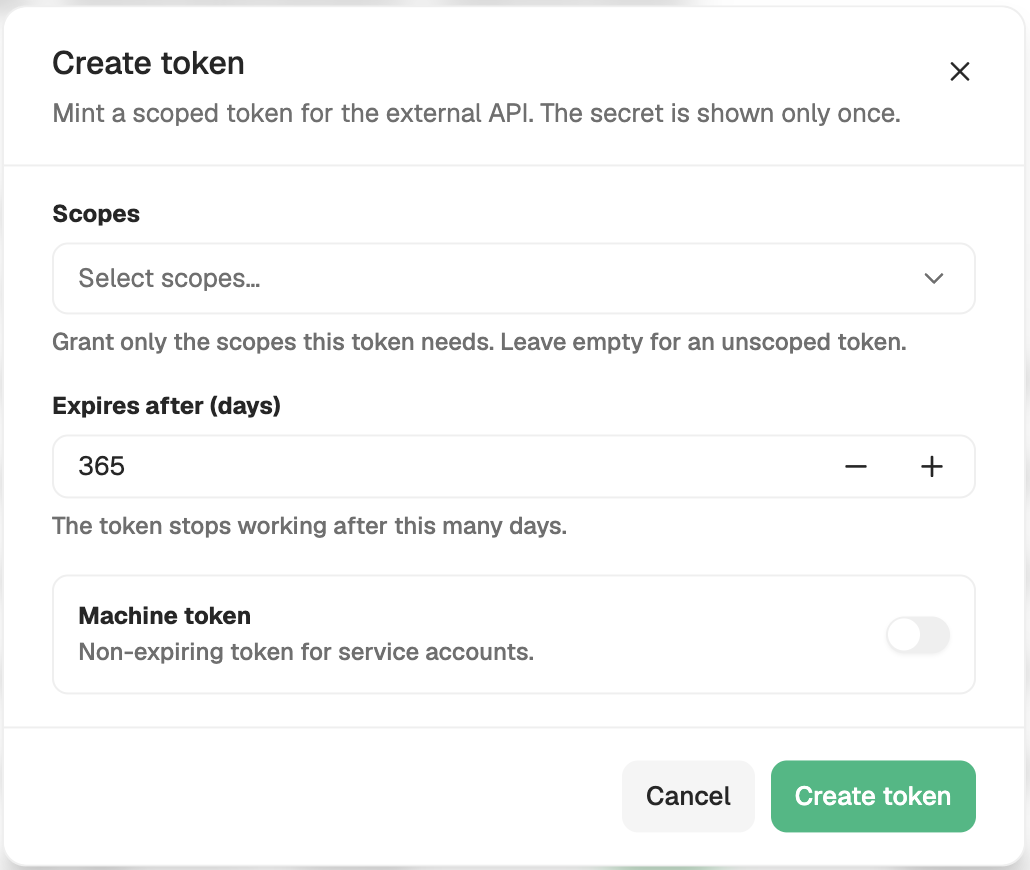
- Click + Create token.
- Name it and select the scopes it should carry (see §4). Grant
only what the integration needs — tokens are least-privilege by design. - Copy the secret — it is prefixed
cred_uapi_and is shown only once. Store
it in a secret vault.
Tokens are user- and workspace-scoped, can be given an expiry (default 1 year), and
are revocable any time from the same page.
3. Run Your First Call
- In the playground, pick an operation (e.g. Matching → Match Company).
- Paste your
cred_uapi_…token into the Bearer field on the right. - Fill in the body params (each field shows a description and example).
- Click Try It! — the response appears inline.
- To use it from your own code, switch the language tab (Shell / Node / Python /
…) and copy the generated snippet — it already contains the correct endpoint
for the environment and your token, so it runs as-is.
That copy-the-snippet flow is the recommended way to integrate: the playground is
the source of truth for the exact request shape, so you never hand-write the
endpoint or query.
4. Scopes
Scopes follow the shape <action>:<resource>. The action vocabulary is fixed —
read, match, enrich, write, action. A token carries a set of scopes; each
operation requires exactly one and returns 403 if the token doesn't carry it. The
scope picker lists exactly these (it's derived from the live operation registry):
| Scope | Grants |
|---|---|
match:read | Matching operations |
enrich:write | Enrichment |
read:companies | Companies connection |
read:persons | People connection |
read:contacts | Contacts connection |
read:deals | Deals connection |
read:analytics | Usage & sequence analytics |
read:fields | Field catalog / schema discovery |
write:opportunities | Create / update opportunities |
write:lists | Add items to lists / collections |
write:crm | Trigger CRM sync |
write:alerts | Create news / web-alert monitors |
write:sequences | Enroll / pause / resume / unenroll sequence members |
write:workflows | Create / update / delete workflows |
action:workflows | Test / run workflows |
action:reports | Generate / schedule reports |
action:scoring | Trigger custom-score runs |
action:imports | Trigger imports |
action:assistant | Query the AI assistant |
Under Settings → API Access you can also review Exposed fields & operations
(exactly what your token can reach) and Usage & live activity (recent calls,
per-scope usage, errors).
5. Operation Surface
Each operation's required scope is shown below and in the playground. Reads are
GraphQL queries; state changes are mutations.
Matching — match:read
match:readapiMatchCompany, apiMatchPerson, apiMatchCompaniesBatch, apiMatchPeopleBatch,
apiMatchAccountOwner — match a partial record → ranked candidates + confidence.
Enrichment — enrich:write
enrich:writeenrichEntityFields — enrich contact / company / relationship fields on a matched entity.
Data Connections
Paginated reads (Relay-style cursor pagination):
apiCompaniesConnection (read:companies), apiPersonsConnection (read:persons),
apiContactsConnection (read:contacts), apiDealsConnection (read:deals).
Assistant — action:assistant
action:assistantapiAssistant — run the CRED AI assistant to completion; returns JSON.
Fields & Schema — read:fields
read:fieldsapiFieldCatalog — enumerate the exposed field catalog for an entity type.
CRM & Lists
createOpportunities / updateOpportunity (write:opportunities),
addItemsToCollection (write:lists), syncCRMManually (write:crm),
createNewsMonitor (write:alerts).
Workflows & Sequences
enrollContacts / pauseSequenceEnrollment / resumeSequenceEnrollment /
unenrollContact (write:sequences); createWorkflow / updateWorkflow /
deleteWorkflow (write:workflows); testWorkflow / runWorkflow (action:workflows).
Reports & Scoring
Report generation & scheduling (action:reports); triggerCustomScoreRun (action:scoring).
Imports — action:imports
action:importsapiTriggerImport — trigger a data import.
Analytics — read:analytics
read:analyticsSequence metrics (sequenceTemplateMetrics, sequenceVariantMetrics,
sequenceMetricsTimeSeries, sequenceStepMetrics, sequenceChannelMetrics) and
customerSourceUsage.
6. Example Operations
These are exactly what the playground pre-fills; run them there or copy the snippet.
Match a company — apiMatchCompany (match:read)
apiMatchCompany (match:read)query ($input: ApiMatchCompanyInput!) {
apiMatchCompany(input: $input) {
best { id score action entitySnapshot }
candidates { id score action signals { name score weight reason } entitySnapshot }
confidence
personalEmailToExec { id score entitySnapshot }
}
}Variables: { "input": { "name": "Stripe", "websiteUrl": "stripe.com", "country": "United States" } }
Page through companies — apiCompaniesConnection (read:companies)
apiCompaniesConnection (read:companies)query ($input: ApiConnectionInput) {
apiCompaniesConnection(input: $input) {
totalCount
pageInfo { hasNextPage endCursor }
edges { cursor node { id name websiteUrl headquarters numberOfEmployees ticker foundedYear } }
}
}Variables: { "input": { "first": 25, "after": null } } — pass the previous
pageInfo.endCursor as after for the next page. apiPersonsConnection /
apiContactsConnection / apiDealsConnection take the same input and shape.
Ask the assistant — apiAssistant (action:assistant)
apiAssistant (action:assistant)query ($input: ApiAssistantInput!) {
apiAssistant(input: $input) { response conversationId finishedAt }
}Variables: { "input": { "prompt": "Summarize my top 3 open opportunities." } } —
pass the returned conversationId back to continue the thread.
7. Error Handling
Auth / rate-limit errors come back as HTTP errors; validation / scope errors come
back in the standard GraphQL shape with extensions.code.
| Scenario | HTTP | Meaning / fix |
|---|---|---|
Missing Authorization | 401 | Paste a cred_uapi_ token in the Bearer field |
| Invalid / revoked / expired token | 401 | Mint a new token in Settings → API Access |
| Token missing the operation's scope | 403 | Re-mint the token with that scope |
api_external_v2 not enabled for workspace | 403 | Ask your CRED account team to enable the API |
| Invalid query / unknown field | 400 | GRAPHQL_VALIDATION_FAILED — fix the query/variables |
| Rate limit exceeded | 429 | Slow down; page with cursors |
8. Rate Limiting & Governance
- Token validity: default 1 year; custom expiry at creation; revocable anytime.
- Rate limits: enforced per token and per workspace; exceeding returns
429.
Exact quotas are plan- and environment-dependent — confirm with your CRED account team. - Pagination: data connections use cursor pagination (
pageInfo.endCursor→after). - Idempotency: matching operations accept an
idempotencyKey; same tenant + key
within 24h returns the same result (safe to retry).
9. Security
- Tokens are prefixed
cred_uapi_, are user- and workspace-scoped, and least-privilege via explicit scopes. - Secrets are shown once at creation — store them in a secret vault.
- All traffic requires TLS.
- Full audit of token activity is available in-platform (Usage & live activity).